
D7Discord bot
The Rust Discord bot that brings your team chat to Discord
RustSurvivor is a Rust+ Discord bot. One /install command sets up channels for your team chat, raid alerts, smart switches and tracked players, so your squad can follow the server and talk to whoever is in game without opening Rust.
24 hour free trial, no card needed. The open beta is free, and Pro is $6/month or $48/year.
D8Team chat relay
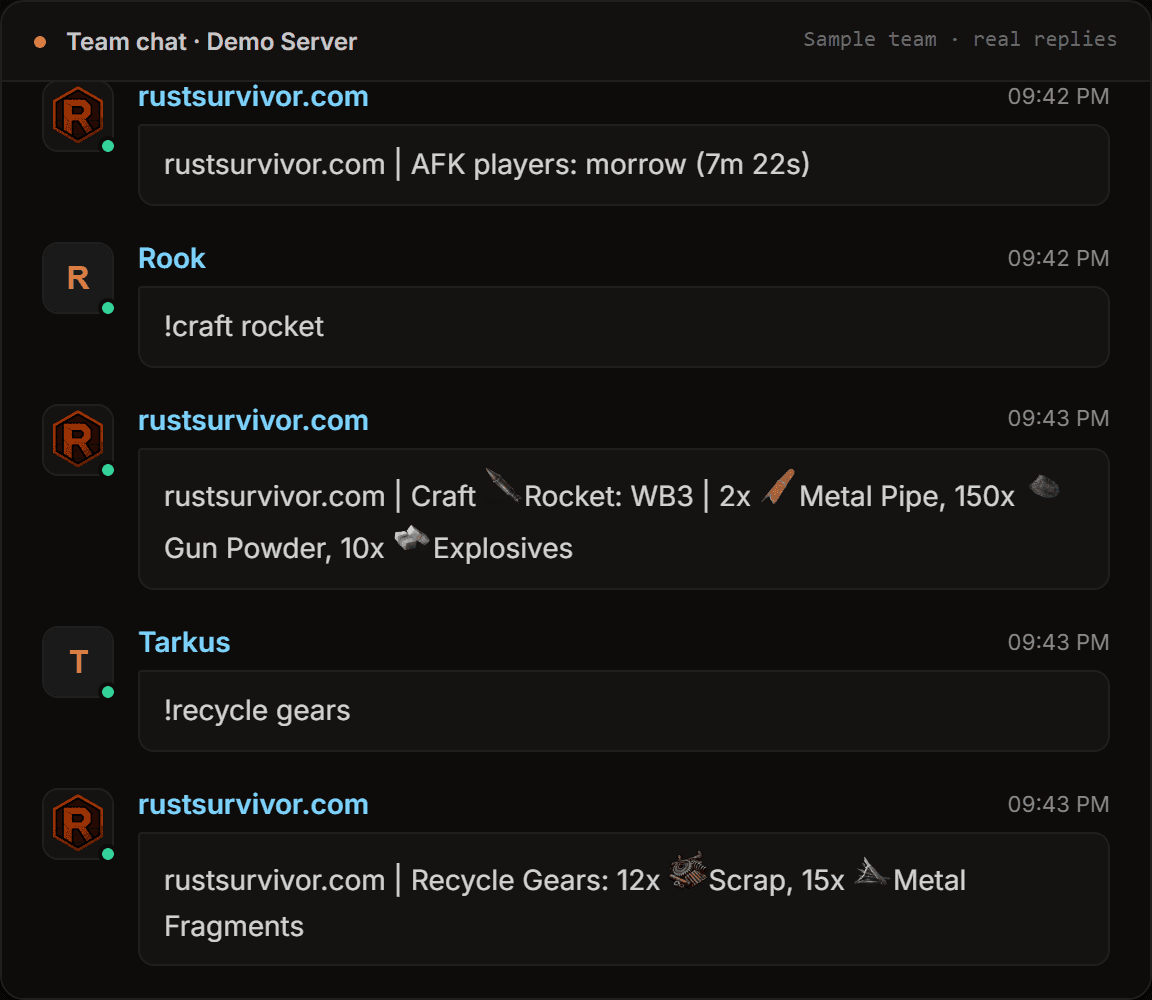
Your Rust team chat, inside Discord
Most Discord bots for Rust only post notifications. RustSurvivor relays the chat itself: everything your team writes in game appears in #team-chat, and anything you write in that channel is sent to the team in game. Clan chat works the same way in #clan-chat.
In-game commands work from Discord too. Type !pop or !team in #team-chat and the answer shows up in both places. With several servers paired, every message says which server it came from, and replying to a line sends your message to that server only.
D9Channels
One install, every channel
/install creates one RustSurvivor category for all your servers and keeps channels you already have. Live cards update by themselves, and if a channel is deleted the bot puts it back.
- informationBot status, your plan and a guide to the channels.
- serversOne live card per server: players, time, wipe, map and your team.
- team-chatIn-game team chat, both ways. !commands work here too.
- clan-chatYour in-game clan, its members and clan chat, both ways.
- switchesOn/off buttons, Rename and Pair device for every smart device.
- activityTeammates online and offline, deaths, AFK, joins and leaves.
- trackerLive list of tracked players, with an alert when they log on or off.
- alertsRaids and Smart Alarms with @everyone, storage and wipes.
- settingsEvery website setting as buttons and menus (installer only).
D10Setup
Add the bot in three steps
- 1
Pair your Rust server
Sign in at rustsurvivor.com/start, link Rust+ with the extension and pair your server in game (Esc → Rust+ → Pair Server).
- 2
Invite the bot
In the dashboard open the Discord Bot tab and click Add bot to server. The tab then shows which game servers post there and any missing channel or permission.
- 3
Run /install
Run
/installin your Discord server, then let your team in with/role addor by picking a role in/install.
D11Commands
Slash commands for your team
/install [role]Creates the RustSurvivor category and its channels./role add <role>Lets a Discord role see the channels./switch toggle <id> [state]Turns one smart switch on or off./switch all <state>Turns every switch on a server on or off./alarm test <id>Sends a test notification from an alarm./upkeep [id]Tool Cupboard upkeep status./tracker add <BattleMetrics link>Track a player in #tracker./ai <question>Ask the RustSurvivor AI about raids, crafting and more./clear [amount]Clears a channel and keeps the live cards.
The full list, with who can use each one, is in the slash command docs. Raid alarms in #alerts are covered in the raid alarm guide.
#settings from Discord
Change every setting with buttons, menus and forms. A change shows up on the website and in game right away.
Translate chat
Translate team and clan chat and Discord messages into any of 20 languages with /translate or the message menu.
Questions, answered
- How do I add the Rust Discord bot to my server?
- Open the Discord Bot tab in the RustSurvivor dashboard and click Add bot to server, then run /install in your Discord server. It creates a RustSurvivor category with every channel, shared by all the Rust servers you pair. By default only you and the bot can see them; add your team with /role add.
- Can I talk to my team in game from Discord?
- Yes. #team-chat shows your in-game team chat live and #clan-chat your clan chat, and anything you write there is sent to that chat in game. Reply to a line to send it to that server only.
- What happens if someone deletes a bot channel?
- The bot repairs itself: deleted channels come back with their name, permissions and position, and the live cards are posted again.
- Who can change the bot settings in Discord?
- Only the person who installed the bot in a Discord server sees #settings and can run /install, /uninstall and /clear there. Members can read the other channels, write in #team-chat and #clan-chat, and use the buttons.
- Do I need Discord to use RustSurvivor?
- Every account links Discord once, but the bot in your Discord server is optional. The dashboard works in any browser with the same alerts, map and devices.
More about RustSurvivor
- Rust+ botHow RustSurvivor works with the Rust+ companion app: pairing, alerts, commands and the live map.
- Rust raid alarmSmart Alarm raid alerts to Discord, Telegram and team chat, with online raid mode.
- Rust player trackerOnline and offline alerts for the players you track, clan radar and player lookups.
Free Rust tools
Set it up in about 5 minutes
Sign in with Steam, link Rust+ once with the extension and pair your server in game. The first 24 hours of Pro are free.