
R1Rust+ bot
The Rust+ bot that stays online when you log off
RustSurvivor is a Rust+ (Rust Plus) bot. It connects to your Rust server through the official Rust+ companion feature and keeps that connection open around the clock, so your team gets raid alarms, chat commands and a live map even when nobody is in game.
24 hour free trial, no card needed. The open beta is free, and Pro is $6/month or $48/year.
R2Rust+ explained
What a Rust+ bot actually does
Rust+ is the official companion app from Facepunch. When you pair a server in game, Rust+ can read your team list, your paired Smart Switches, Smart Alarms and Storage Monitors, the map and your team chat. The phone app shows you that information while it is open.
A Rust+ bot uses the same pairing but keeps the connection running on a server instead of your phone. That is what makes it useful: it can answer commands in team chat, forward alarms to Discord and Telegram, flip switches on a schedule and record what happened while you were asleep. RustSurvivor does this in the cloud, so nothing has to run on your computer.
It also has limits that come from Rust+ itself: it only ever sees your own team and your own devices. It cannot show enemy players on the map, and it cannot see cargo ship, patrol heli or vending machines, because the game no longer sends those markers to Rust+.
R3Setup
Set up the Rust+ bot in about 5 minutes
- 1
Sign in with Steam
Open rustsurvivor.com/start and sign in with Steam’s official login. Your first 24 hours of Pro are free, no card needed.
- 2
Link Rust+ once
Add the RustSurvivor extension for Chrome, Brave or Firefox. It links your Rust+ companion login so the pairings you make in game reach your account. You only need it during setup.
- 3
Pair your server and devices
In game press Esc → Rust+ → Pair Server. Then look at a Smart Switch, Smart Alarm or Storage Monitor, hold E and choose Pair. They show up in your dashboard straight away.
A short guided tour and a “Get set up” checklist in the dashboard walk you through each step. Want the bot in Discord too? Run /install in your Discord server, see the Rust Discord bot guide.
R4Features
What you get once it is paired
Raid alerts
Smart Alarms reach Discord, team chat, Telegram and the dashboard, with online raid mode when nobody is on. See the raid alarm guide.
Team chat commands
!pop,!team,!time,!craft ak,!recycle gears,!timer 5mand more, answered by the bot for the whole squad.Smart switches
Any device name works as a command, like
!turrets on. Flip switches from the browser or Discord, and check Tool Cupboard upkeep with!upkeep.Live map
Your teammates, monuments and base zone updated live, with a death log, death markers, shared map notes and farm routes.
Player trackers
Get told when the players you watch log on or off, and see clans grouped by tag. More in the player tracker guide.
Workflows
No-code rules: an alarm, a switch, a time of day, in-game night or a teammate near a place can trigger switches and messages.
R5Dashboard
Every server in one place
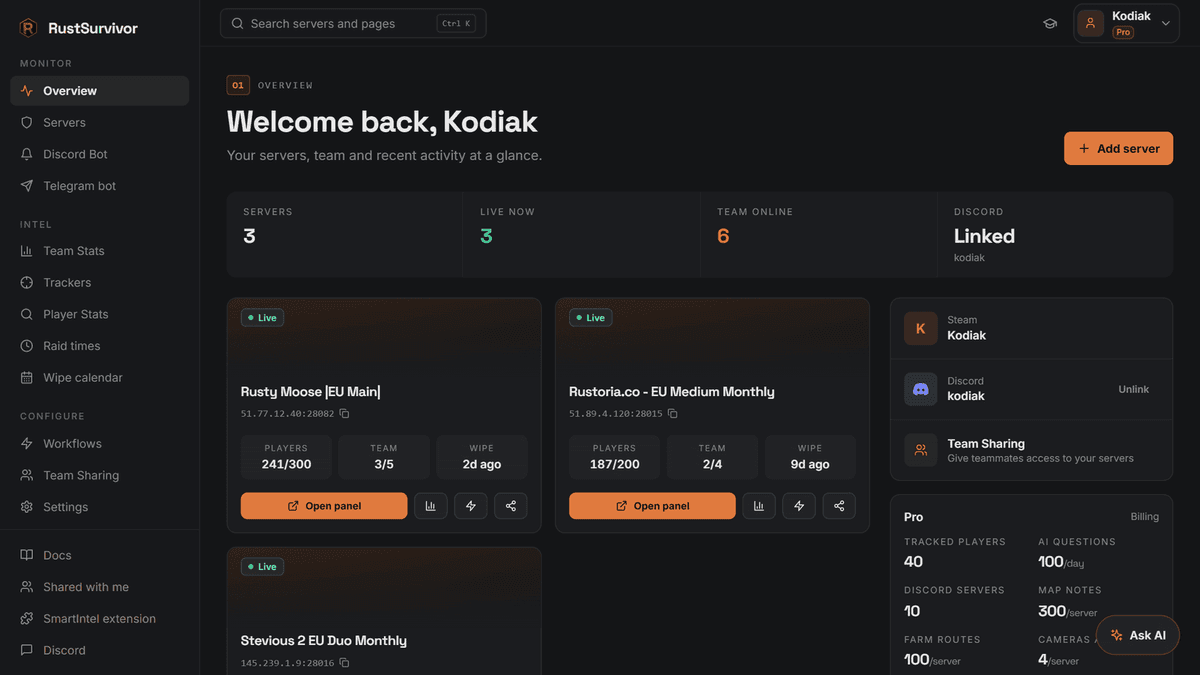
Pair as many servers as you like. Each one gets its own live panel with the map, smart devices, team status, deaths and raid history, and its own settings. The panel works in any browser, so you can keep it open on a second screen while you play or check it on your phone mid-raid.
Playing with friends who also use RustSurvivor? Only one bot speaks in team chat per team, and Team Sharing gives teammates Manager or Viewer access to your server without sharing your account.
Questions, answered
- What is a Rust+ bot?
- A Rust+ bot is a program that connects to your Rust server through the official Rust+ companion feature, the same connection the Rust+ app on your phone uses. It reads your team, your paired devices and the map, and it can answer commands in team chat. RustSurvivor runs that connection for you in the cloud, so it keeps working when your PC and phone are off.
- Can I get banned for using a Rust+ bot?
- RustSurvivor only uses the official Rust+ companion feature from Facepunch, the same one the Rust+ app uses, and you sign in with Steam’s official login. It never asks for your Steam password and it does not touch the game client.
- Do I need to keep my PC or the Rust+ app running?
- No. Once your server is paired, RustSurvivor stays connected in the cloud 24/7. The browser extension is only needed once during setup to link your Rust+ login.
- Can a Rust+ bot see enemy players or cargo ship?
- No. Rust+ only shares your own team, your own paired devices and the map. Facepunch also stopped sending vending machine and event markers (cargo ship, patrol heli, travelling vendor, oil rig crates) to Rust+, so no Rust+ tool can see them. For Oil Rig, wire an RF Receiver to a Smart Alarm and use the Oil Rig crate timer.
- What happens to the bot after a wipe?
- Smart devices reset on every wipe. If the server shows offline, pair it again in game (Esc → Rust+ → Pair Server), then pair your devices. Your settings and Discord channels stay.
More about RustSurvivor
Free Rust tools
Set it up in about 5 minutes
Sign in with Steam, link Rust+ once with the extension and pair your server in game. The first 24 hours of Pro are free.