
G12Raid alarm
Rust raid alarm alerts that reach you anywhere
Wire a Smart Alarm in your base and RustSurvivor turns every trigger into a raid alert in Discord, in game team chat, Telegram and your browser. When the alarms keep going and nobody is online, online raid mode keeps escalating until someone answers.
24 hour free trial, no card needed. The open beta is free, and Pro is $6/month or $48/year.
03:14
Tuesday, wipe day 3
Telegramnow
ONLINE RAID: Main base
Alarms going off for 6 min, nobody online. Tap I’m on it to stop the alerts.
Discord7m ago
#alerts
@everyone Smart Alarm: Main base
G13How it works
From Smart Alarm to raid alert
Rust has a Smart Alarm that sends a notification through Rust+ when it gets power. On its own that notification only reaches the phones that have the Rust+ app open and allowed. RustSurvivor keeps a Rust+ connection to your server open 24/7, so it sees the alarm the moment it fires and forwards it to every place your team actually looks.
Each alert names the alarm and the server it came from, so a team with a main base and an outpost knows which one is being hit. Repeated triggers during the same raid update one Telegram message with a counter instead of flooding the chat.
Discord
Every Smart Alarm pings @everyone in
#alertswith its in-game details. Tracker and team updates get their own channels.In game
The bot posts the alarm in team or clan chat, so whoever is online sees it right away.
Telegram
Loud alerts with sound that repeat every minute (up to 5 times) until someone taps I’m on it. Works in a team group too. Pro and the open beta.
Dashboard
A raid popup with an optional siren on the live panel, and the raid is saved in the server’s Raid alerts feed.
G14Online raid mode
Nobody online? It keeps going until someone answers
Offline raids are where most bases are lost. When your alarms keep firing and no teammate is in game, RustSurvivor moves the alert up a level: first the normal raid alert in #alerts, then a loud Telegram alert that repeats until someone taps I’m on it, then a last @everyone ping in Discord.
The escalation stops as soon as a teammate comes online or the alarms go quiet. Change the timings in Settings → 🚨 Smart Alarm on the website or in the 🚨 Smart Alarm group of the #settings channel in Discord.
G15Setup
Set up raid alerts
- 1
Wire the Smart Alarm
In game, place a Smart Alarm and power it from a sensor: an HBHF sensor behind your doors, a turret or anything else that outputs power when the base is hit.
- 2
Pair it
Pair your server (Esc → Rust+ → Pair Server), then look at the alarm, hold E and choose Pair. It shows up in the dashboard, and
!alarmslists it in team chat. - 3
Choose where alerts go
Run
/installin Discord for#alerts, and link the Telegram bot from the dashboard for alerts on your phone. Send a test to make sure it arrives.
Not sure how much your base can take? Check your walls and doors in the free Rust raid calculator, and plan the sensor and power for your alarm in the electricity planner.
G16Smart base
Alarms, switches and upkeep together
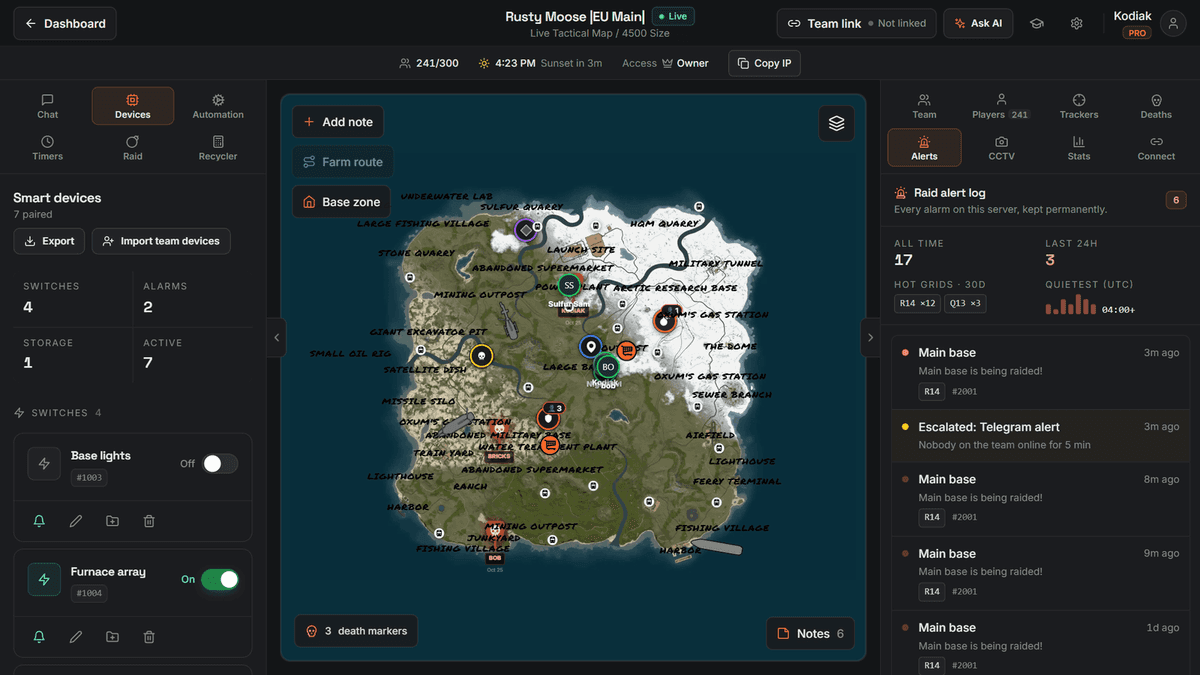
Your alarms sit next to your Smart Switches and Storage Monitors in the dashboard. Test an alarm with one click, turn turrets on when the raid starts (!turrets on in team chat works too) and see how long your Tool Cupboard has left.
Workflows can react to an alarm on their own: turn on a switch group, post in team chat or send a Discord message the moment the alarm fires.
Questions, answered
- How do I get Rust raid alerts when I am offline?
- Wire a Smart Alarm to a sensor in your base (for example an HBHF sensor or a turret), pair it in game with hold E → Pair, and RustSurvivor sends every trigger to Discord, team chat, Telegram and the dashboard. It runs in the cloud, so alerts arrive with your PC and the game closed.
- What is online raid mode?
- If your raid alarms keep going off and nobody on your team is online, RustSurvivor steps up the alerts: first the raid alert in #alerts, then a loud Telegram alert that repeats until someone taps I’m on it, plus a last @everyone ping. It stops as soon as someone comes online or the alarms go quiet.
- Can the raid alert sound like an alarm on my phone?
- Yes. Send /sound to the RustSurvivor Telegram bot, save the audio for notifications and pick RustSurvivor Raid Alarm as the chat’s notification sound. Telegram follows your phone’s silent mode, so allow it through Focus or Do Not Disturb if you want it to wake you.
- Are Telegram raid alerts included in the free trial?
- Telegram alerts are part of Pro and the open beta. The 24 hour free trial includes Discord, in-game and dashboard raid alerts.
- My raid alerts do not arrive. What should I check?
- Open Settings → 🚨 Smart Alarm: check the alarm is listed under Your alarms, that the places you want (In game, Discord, Telegram, This website) are on and that Discord or Telegram is linked. Tap Test next to the alarm, or use /alarm test in Discord, to check delivery.
More about RustSurvivor
- Rust+ botHow RustSurvivor works with the Rust+ companion app: pairing, alerts, commands and the live map.
- Rust Discord botTeam chat in Discord both ways, live server cards, switches and slash commands.
- Rust player trackerOnline and offline alerts for the players you track, clan radar and player lookups.
Free Rust tools
Set it up in about 5 minutes
Sign in with Steam, link Rust+ once with the extension and pair your server in game. The first 24 hours of Pro are free.