S1Browser extension

Know who you are fighting with SmartIntel, the free Rust player lookup extension

RustSurvivor SmartIntel adds a player intel panel to BattleMetrics and Steam: true total hours, ban flags, recent activity and who they play with, without leaving the page.

FreeNo account neededAlso works in Brave and Opera

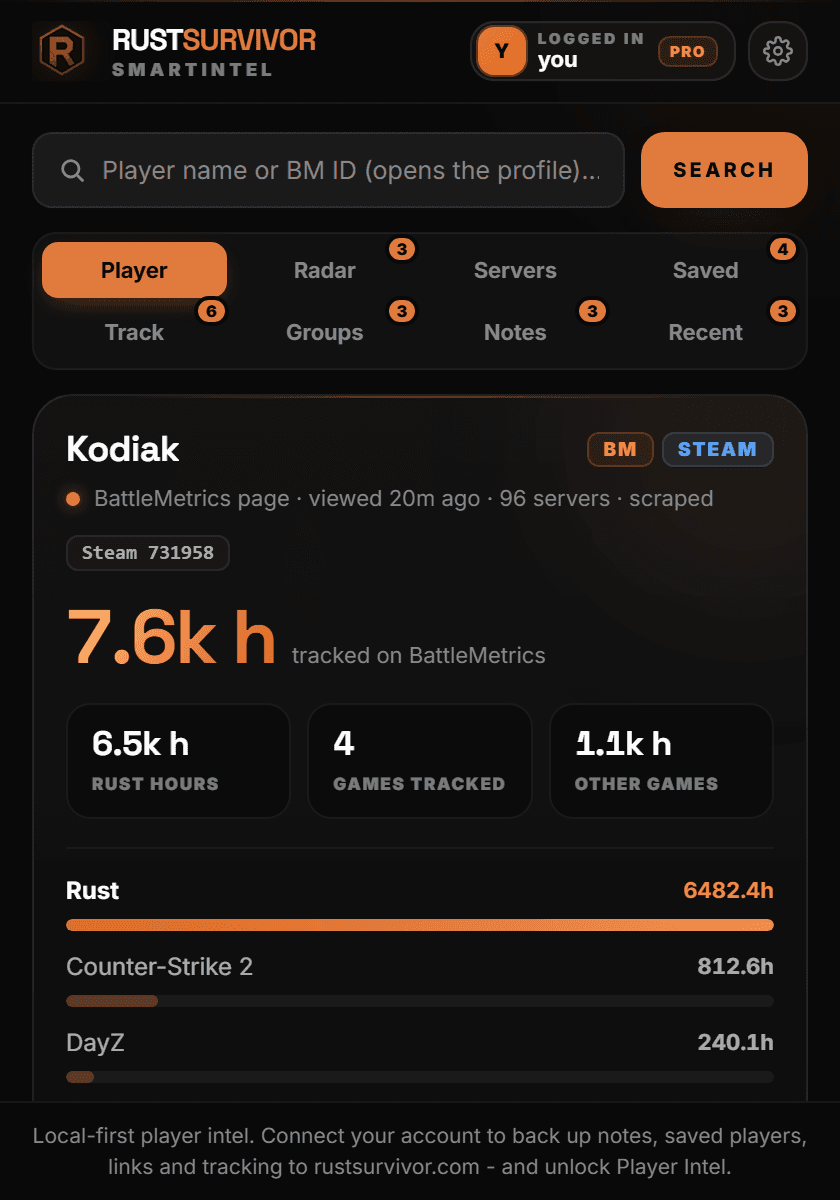
The SmartIntel popup showing a player's tracked hours and games
The real extension popup, shown with sample data.

V2See it in action

What it looks like

Real screenshots of the current extension on BattleMetrics, on Steam, in the popup and in settings.

battlemetrics.com/players/…
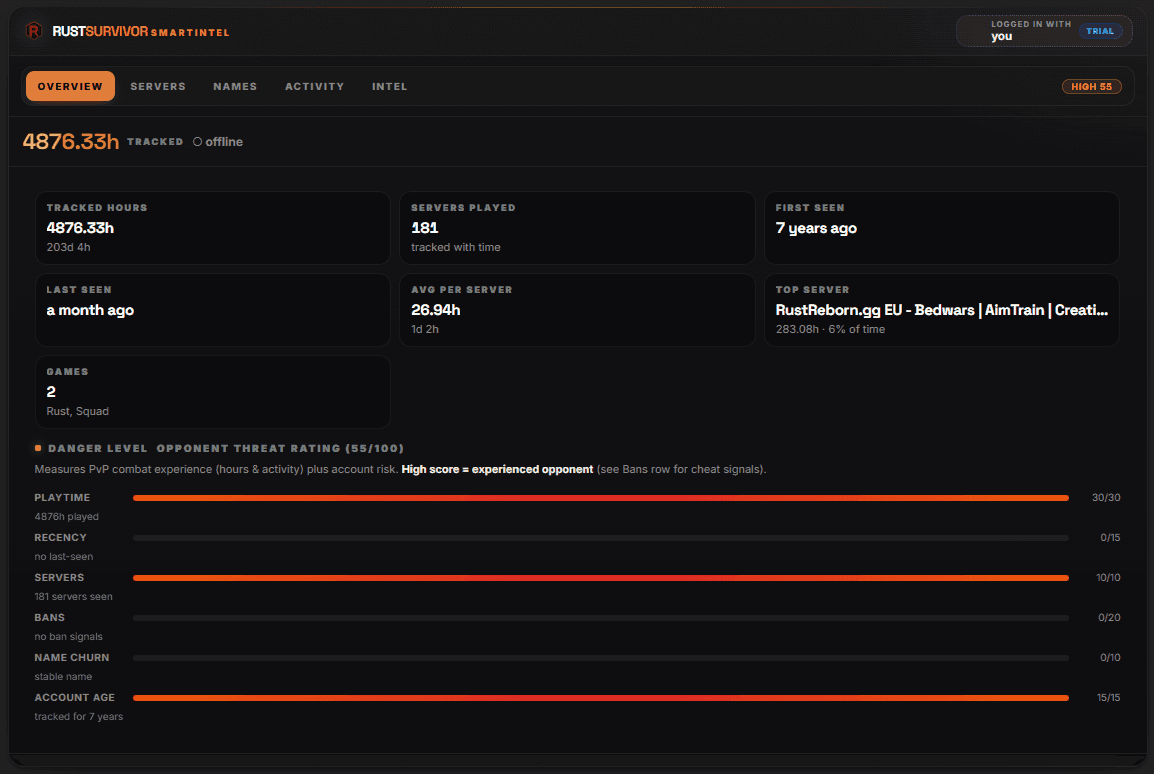
SmartIntel: Every profile becomes an intel file

01 / 04

Every profile becomes an intel file

Tracked hours, servers, first and last seen, top server and a threat rating you can actually read, right on the player page.

  • Tracked hours and server footprint
  • Explainable 0-100 threat rating

B4Where it works

Right on the pages you already use

No new site to check. The panel shows up on BattleMetrics player pages and Steam profiles as soon as they load.

BattleMetrics player pages

BattleMetrics only shows playtime for about five servers per player. SmartIntel opens every server block and adds it all up: one true total plus a per-server list ranked by hours.

  • Info bar next to the name: total hours, first seen, server count, online status and other names used.
  • Ban flags: servers that banned this player, listed in red.
  • A 14-day activity chart (needs you logged in to BattleMetrics).
  • Who they usually play with.
  • On server pages: a private server note and a search box to filter the player list.
  • A small diamond badge next to players you have noted, tagged or linked, anywhere on BattleMetrics.

Steam profiles

Open any public Steam profile and see what actually matters for Rust.

  • Exact Rust hours: the all-time total, not just recent activity.
  • Total hours across all their games.
  • VAC and game ban checks.
  • Online status and recent activity.
  • Quick buttons: copy the SteamID, check account value on SteamDB, find them on BattleMetrics.
  • Private profiles are detected and skipped.

F7What you see

The intel, at a glance

True total hours

Every BattleMetrics-tracked server counted, not just the few the site shows.

Ban flags

Server bans on BattleMetrics, VAC and game bans on Steam, at a glance.

14-day activity

A chart of how much they have played over the last two weeks.

Plays with

See who a player usually plays with, so you know the group, not just the name.

Steam ↔ BattleMetrics

Link a Steam profile to a BattleMetrics player once. Both pages remember it.

Notes and tags

Private notes and tags per player, with optional fresh or veteran auto-tags by hours.

P2Free and Pro

Free to use, more when you connect

Everything on BattleMetrics and Steam works without an account. Connecting one adds sync and Player Intel.

No account

Free

Install and go. Everything is stored in your browser.

  • Hours, ban flags, 14-day activity and plays with
  • Steam hours and ban checks
  • Steam ↔ BattleMetrics linking
  • Local notes, tags and badges

Free account

Free

Sign in with Steam from the extension settings.

  • Everything in no account
  • Player Intel stats summary
  • Notes, tags, saved players, links, tracking and groups sync to your account
  • Hour snapshots saved so your intel grows over time

Pro

Pro plan

Included with RustSurvivor Pro.

  • Everything in free account
  • The full Player Intel signal map: PVP K/D, ban history, known names and hour trends
See Pro plans

Disconnect your account anytime: syncing stops and every local feature keeps working.

H3How it works

Install in three steps

1

Install

Add it from the Chrome Web Store or Firefox Add-ons. Free, no account needed.

2

Open a profile

Visit any BattleMetrics player page or public Steam profile. The panel appears on its own.

3

Connect (optional)

Sign in with Steam in the extension settings to sync your notes and unlock Player Intel.

L9Privacy

Local first. Never sold.

Your notes and lists are yours. See the privacy policy for full details.

How your data is handled

  • Everything is stored in your browser first. Nothing leaves your device unless you connect an account.
  • With an account, your notes, saved players, links, tracking and groups sync privately to your own rustsurvivor.com account.
  • The extension only reads the pages you already have open. It does not monitor your browsing.
  • No data is sold or shared with third parties.
  • Export or erase everything from the extension settings at any time.

Q5Questions

Short answers

Does it cost anything?

No. The extension is free and works without an account. A free RustSurvivor account adds sync and the Player Intel stats summary; Pro unlocks the full signal map.

Which browsers are supported?

Chrome and Firefox. Brave, Opera and other Chromium browsers can install the Chrome version from the Chrome Web Store.

Are the hour totals exact?

They come from BattleMetrics-tracked sessions. Servers that hide their data or are not tracked by BattleMetrics cannot be counted. Steam Rust hours are the all-time total from the public profile.

Does it work on private Steam profiles?

No. Steam features need a public profile. Private profiles are detected and skipped.

Do I need a BattleMetrics account?

No. Core features work without one. Logging in to BattleMetrics reveals extra data on their own pages, such as the activity chart and rosters.

How do I link a Steam profile to a BattleMetrics player?

On the Steam profile, click Find on BattleMetrics, then confirm the link on the player page. You can also paste a SteamID or profile URL by hand, and unlink at any time.

Check the next player in seconds

Free for Chrome and Firefox. No account needed.

SmartIntel: Free Rust Player Lookup Extension | RustSurvivor